
Weigh five hundred baskets.
Miss none.
One tap for every basket on the scale. The app adds the kilos, prices by size and takes off the deposit. When you finish, both sides hold the same ticket.
Works with no signal. Try it free, it costs nothing.
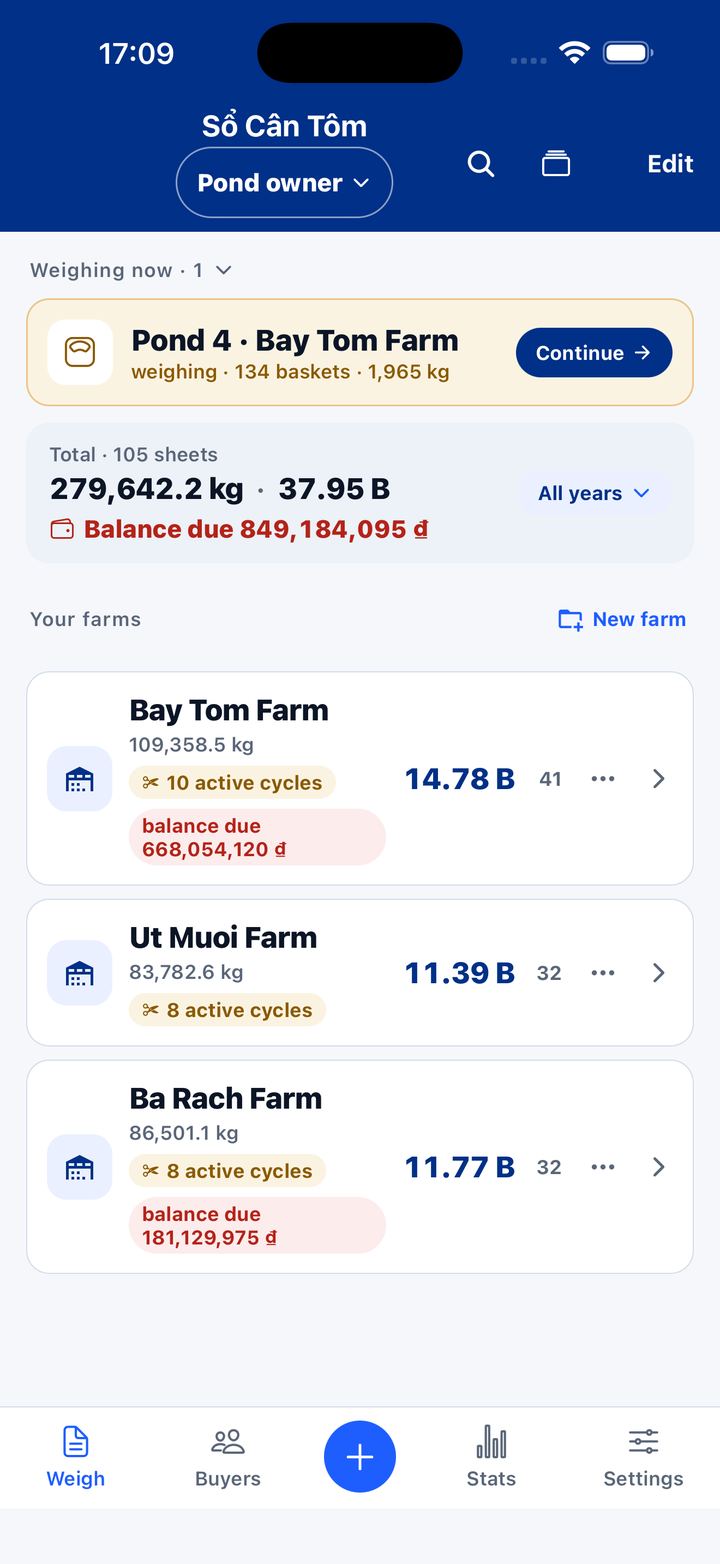
One basket of shrimp is real money. Paper gets wet, ink runs, and nobody can prove who is right.
HOW IT WORKS
In the app, every basket has a number.
The buyer watches the same screen you do. A whole weigh comes down to three jobs: weigh, price, hand over the ticket.
1 · WEIGH
One tap, one basket.
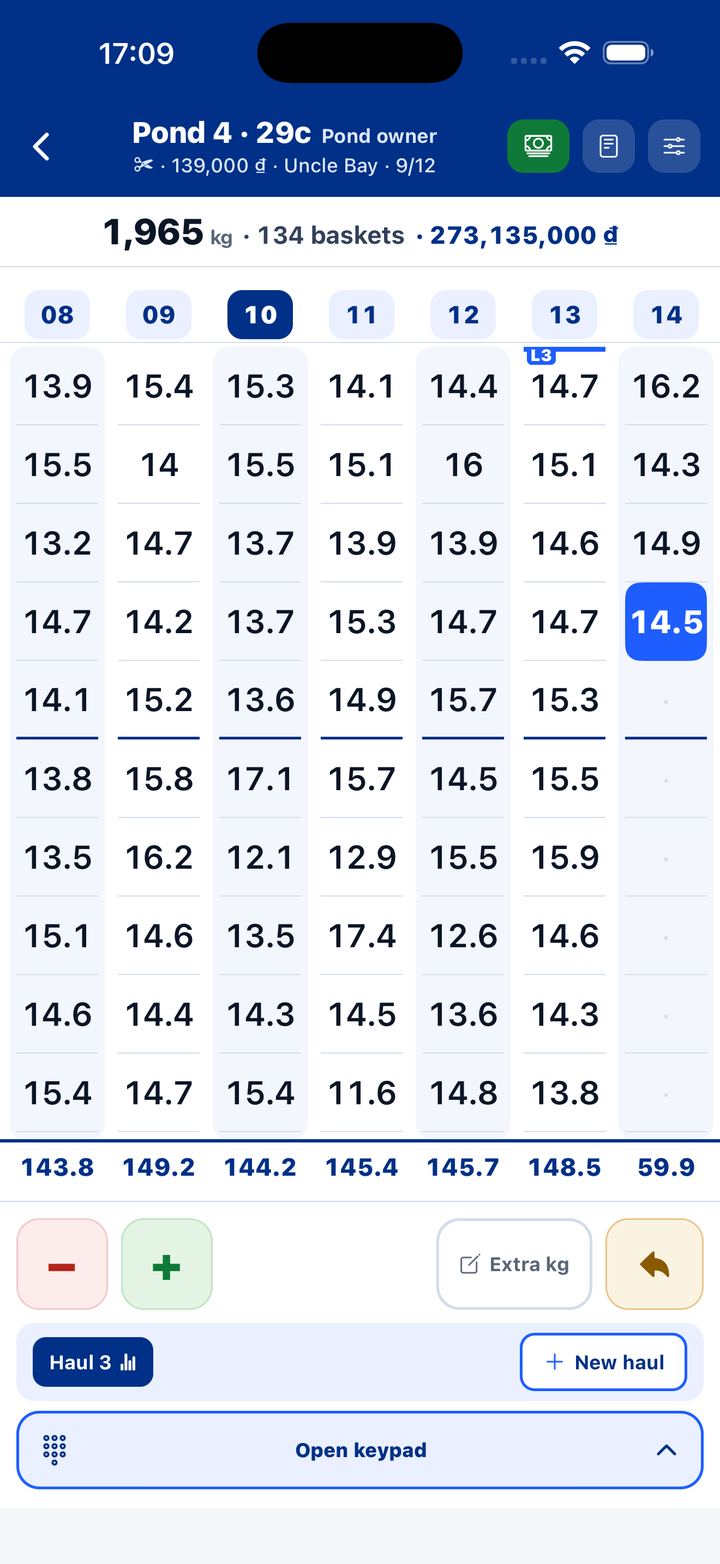
Shrimp on the scale, one tap records the basket. Heavier or lighter than standard? Adjust with − or +. Baskets line up in columns, so one glance tells you which basket you are on.
- Big buttons. Wet hands still hit them.
- Tapped by mistake? Undo puts the count back.
- Rather type what the scale shows? There are four ways to enter weights.
2 · PRICE
The money keeps up with the scale.
Enter the price for the size once. The app adds the kilos, takes off the tare, multiplies by the price and deducts the deposit. Buyer pays in parts? Record each one and the balance updates itself.
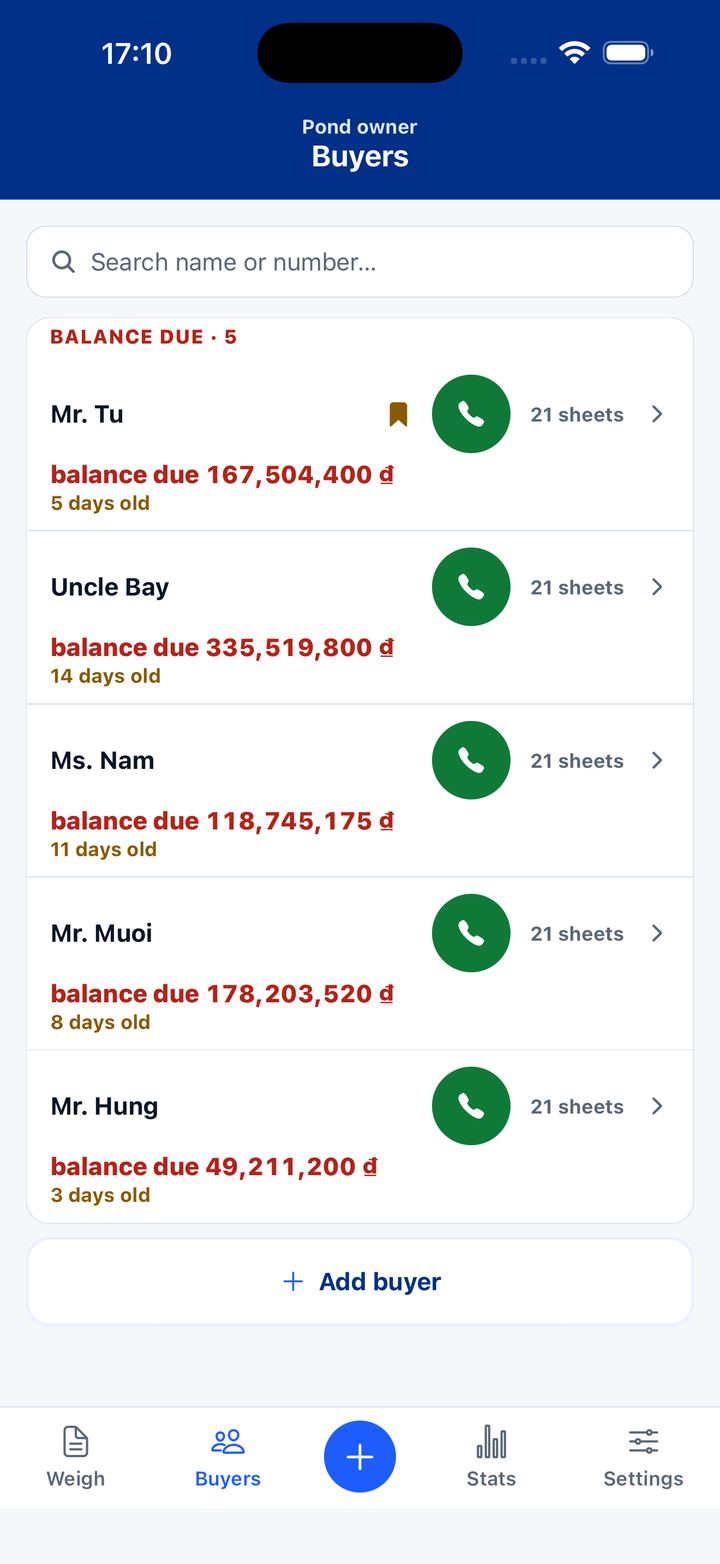
- Who still owes, how much, for how many days: open the Buyers tab and call from there.
- Photograph the bank-transfer slip and keep it with each payment.
- A buyer running five ponds a day? Combine sheets from the same person into one settlement. (Pro)
EVERY WAY TO WEIGH
Any pond, any buyer, any way you weigh.
Whiteleg or tiger shrimp, partial or full harvest, every weighing ground has its habits. Pick the one that fits right inside the sheet, switch any time.
Even baskets
Baskets all about the same weight? Each tap adds one basket at the standard weight. Heavier or lighter ones get − or +.
Uneven baskets
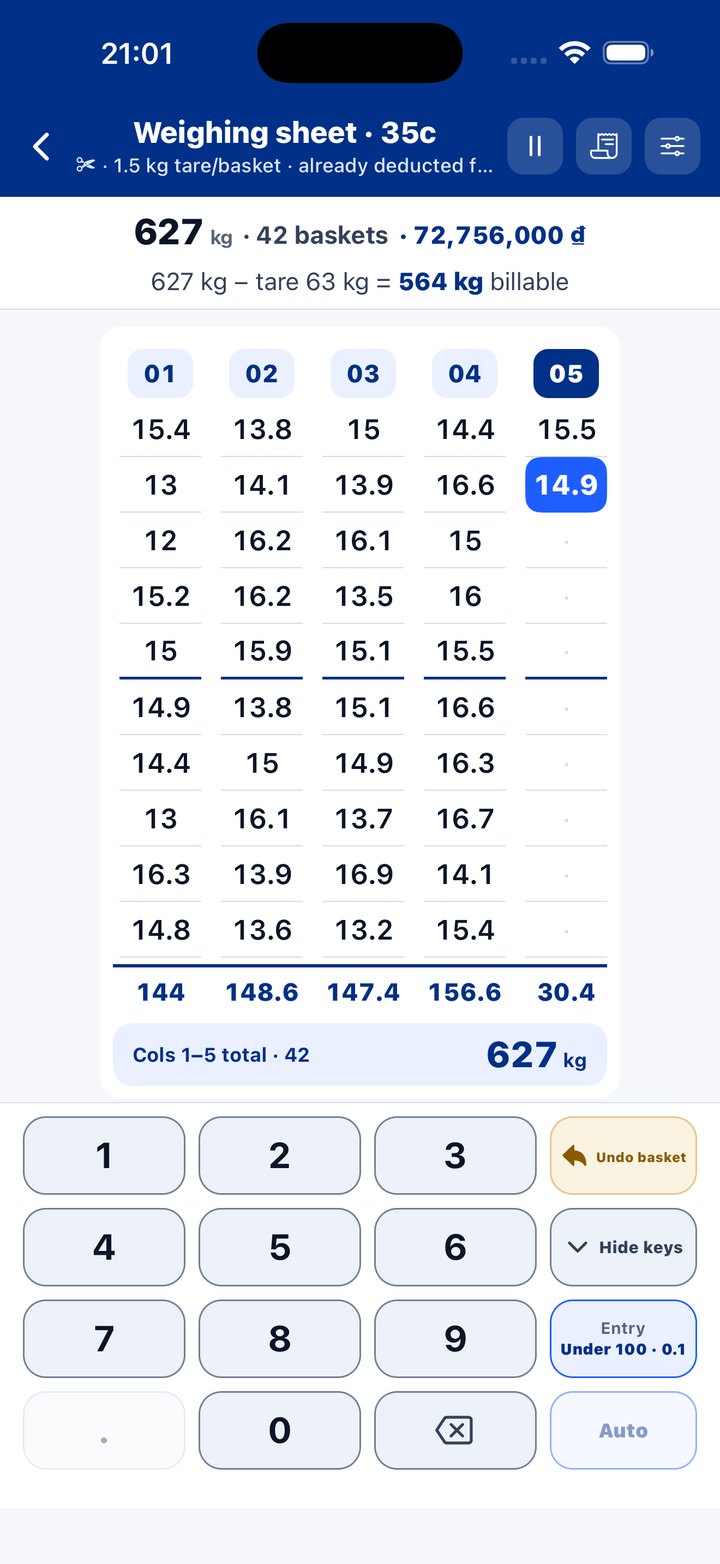
Every basket its own number. Type what the scale shows, up to two decimals, never rounded.
Totals only
Weighing several baskets at once? Record the total for each weighing. Fits platform and truck scales.
By net haul
Finish a net and you know how many baskets and kilos it gave. Compare it with the last haul at a glance.
Basket tare · ice %
Deduct the basket weight, or water and ice as a percent of the total, up to 10%. The scale numbers stay as weighed; the subtraction prints on the receipt.
Blocks of 5
Laid out like a paper weigh book, each block with its own total. A whole block fits on one screen, 10 or 20 rows. Prefer the old way? Pick Scroll across.
Leftover kilos
Not a full basket yet? Log it as leftover, not billed. Once it adds up to a basket, one tap puts it on the sheet.
Partial · full harvest
Each sheet says whether it was a partial or a full harvest. Harvest a pond in several rounds and the book still groups them into the right crop, with the full yield per pond at the end.
Sample shrimp
Buyer takes a sample? Log its weight separately and choose whether it is paid. The receipt keeps goods and sample apart.
Two books
Farm and sell: open the Farmer book. Go buying: open the Trader book. Money in each book runs the right way.
3 · HAND OVER THE TICKET
Weigh done. Ticket in the buyer’s hand.
Six ways to send it. Whatever phone the buyer has, it opens.
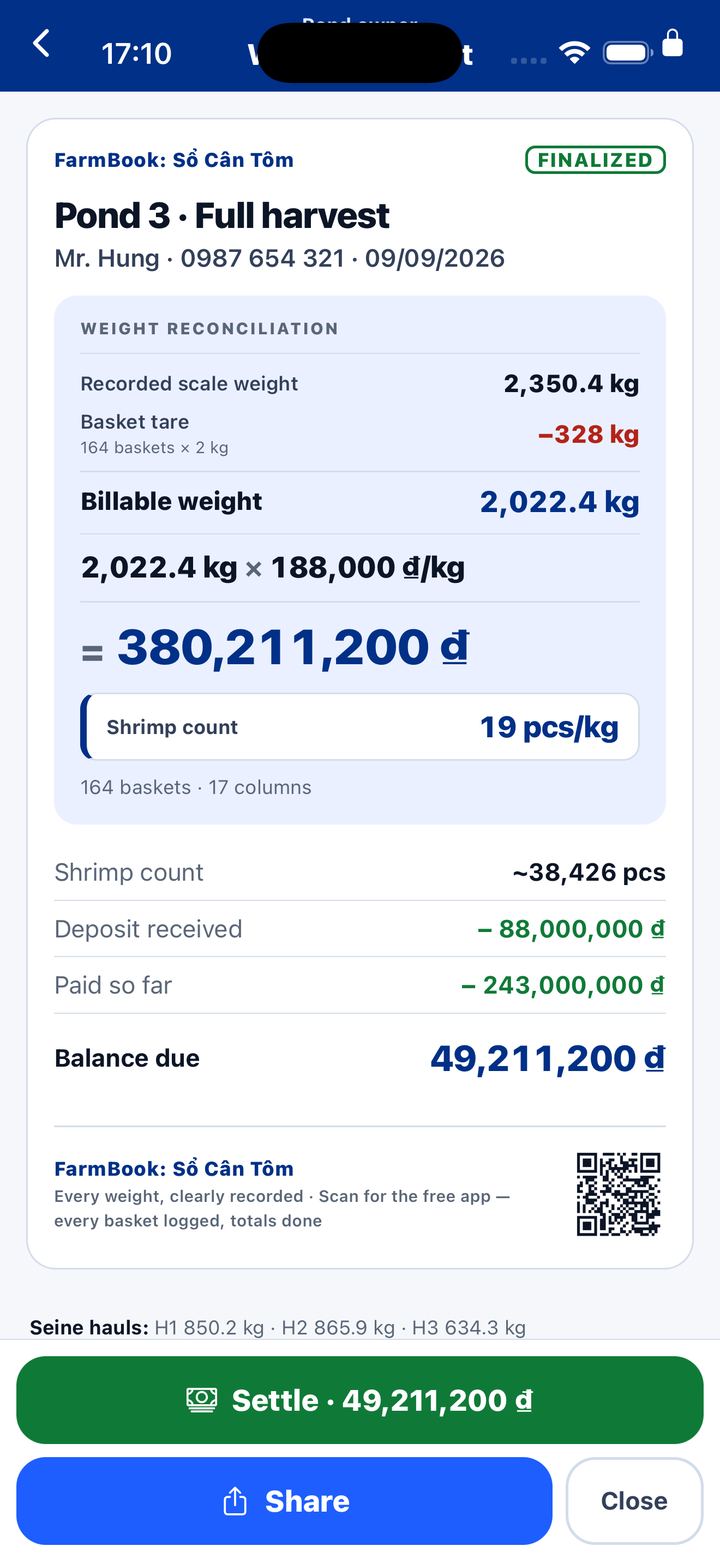
- Text ticket by chat. One message, with a download link for the app. The send button follows the language: Zalo, LINE or WhatsApp.
- Ticket as a picture. The whole ticket as one image. Opens anywhere, nothing to install.
- PDF with a signature line. A4, space for both sides to sign. If no price is set yet, the ticket says so plainly.
- Print it at the pond. A 58 mm Bluetooth thermal printer, two copies, signature lines for both sides.
- Send the whole weigh sheet. By chat or AirDrop. If the other phone has the app, it opens with every basket.
- Two phones, one check. The buyer sends their sheet back and the app compares basket by basket, showing which phone weighed more and which payment is missing. Then you pick Replace, Skip or Keep both.
- Balance statement. (Pro) One page per buyer: which sheets are unpaid, what has been paid, what is left.
The first five are free. PDF tickets carry a QR code at the bottom, so anyone holding one can scan it and get the app.
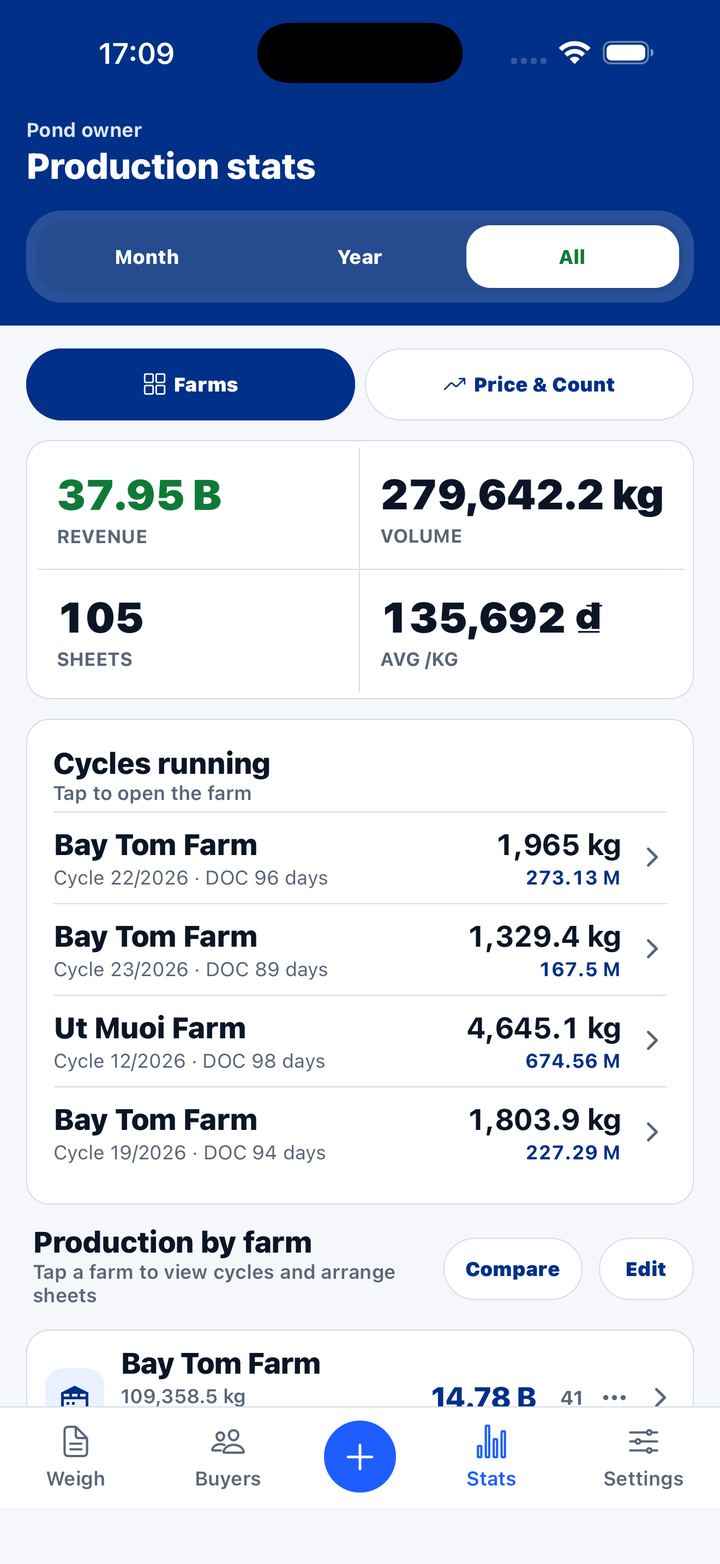
END OF CROP · PRO
Which crop paid. Which one didn’t.
Every weigh stays in the book. At the end of the crop you see output, revenue and price by size for every crop and every pond.
- Enter the total feed once and get the FCR.
- Add the stocking date and quantity to get days of culture and survival rate.
- Two crops side by side. Export reports to PDF or Excel.
Small things, made for the person at the scale.
Each one came from the pond, or from a farmer who asked.
The app calls out each basket’s weight, so your eyes stay on the scale. (Pro)
Three screen modes: Light, Sunlight, Dark. Readable at noon. The screen stays on while you weigh.
Vietnamese, English, Thai. Money in dong, baht or dollars. Only the symbol changes; your numbers are never converted.
Work out shrimp size right while you weigh. You know the count per kilo yourself, no guessing.
Need both hands for a basket? Put the phone down and the sheet holds its place. A stray tap records nothing.
Change a basket’s weight or undo one, and the app keeps a record. Both sides can see it, so nobody argues. It stays on your phone and is not printed on the ticket.
AUTO BACKUP · PRO
Phone in the pond? The book survives.
After every finalize, and once a day, your book saves a copy to your own iCloud or Google. I keep nothing, and it costs nothing extra.
- iPhone saves to iCloud Drive. Open the Files app and the folder is right there.
- Android lets Google upload it to Drive while the phone charges on Wi-Fi.
- New phone: sign in with the same Apple ID or Google account, open the app, tap Restore, and the whole book is back.
- Keeps the last seven copies. Restore merges in, so nothing already on the phone is lost.
WHO MADE THIS
My family farms shrimp in Cà Mau, Vietnam.
Empty one pond and it is three or four hundred baskets, weighed from midnight to sunrise. The paper book sits by the scale. Wet hands, wet paper, running ink. Slip one column and you lose several rows, more than seventy kilos of shrimp.
For four years I kept our book in a rice-weighing app, more than three hundred sheets. But rice has no sizes, no deposits, no debts per buyer. I never found an app made for shrimp, so I built one, for my own family first.
Now four years of our family’s book live inside this app. I weigh every harvest with it, so when something isn’t right, I find out first.
More than 23,000 baskets of shrimp.
One book in your shirt pocket.
What people say
Screenshots straight from the App Store, Google Play and TikTok, not one word changed. They are in Vietnamese, because that is where the app started.
See them all →Try it first. If it earns its keep, pay once.
Try it free, enough to know whether it suits your hands. If it does, unlock Pro and weigh without limits.
Free
0₫
No account. Open the app and start weighing.
- Weigh, take off tare, price by size, deduct deposits
- Record debts and payments for each weigh sheet
- Every kind of ticket: text, picture, signable PDF, 58 mm print
- Send a whole weigh sheet by chat or AirDrop
- No ads, no hidden fees. The app shows how many free sheets are left
Pay once
Pro for life
399,000₫
About the price of a few kilos of shrimp. Pay once, keep it.
Anything added later is included. No auto-charge, no hidden fees.
- Auto backup to iCloud or Google after every finalize. New phone? Tap Restore and the whole book comes back. Excel backup included
- Unlimited weigh sheets
- Full debt book per buyer, send balance statements
- Combine sheets from one buyer into one settlement
- Statistics per crop and per pond: output, revenue, price by size, FCR, crop comparison
- The app reads each basket’s weight aloud
Want to try Pro for one crop first? There is a yearly plan at 199,000₫. Use it two years and lifetime is the better deal.
No ads, everYour book stays on your phone. Nobody’s data is for sale.
Prices are shown in Vietnamese dong and include tax; the App Store and Google Play show the price in your own currency. The lifetime plan never auto-charges. The yearly plan auto-renews on iPhone (cancel any time); on Android it is prepaid for one year and does not renew. Free limits are set out in the Terms.
Questions
Is the app in English and Thai?
Yes. It opens in your phone’s language: Vietnamese, English or Thai. Switch any time in Settings. Tickets, statements and the in-app handbook come in all three.
No signal at the pond?
Weigh as usual. Weighing, pricing, debts and printing all work without internet. Only buying Pro needs a connection for a moment, so the store can confirm it.
Does the app send my data anywhere?
Weights, amounts, buyer names and phone numbers never leave your phone. Since version 21.8.34 the app sends a few anonymous signals, like “app opened” or “sheet finalized”, so I can tell it is working. To stop that, turn off Settings → Send anonymous usage data. Details on the Privacy page.
If I lose my phone, do I lose my book?
Not with Pro. After every finalize, and once a day, the book saves a copy to your own iCloud or Google. Get a new phone, sign in with the same account, open the app, tap Restore, and the whole book is back. On the free plan the book lives only on the phone, so losing the phone means losing the book.
What if I change phones?
Open the app on the new phone and tap Restore: Pro pulls in the latest automatic backup. Moving between iPhone and Android? Back up to an Excel file on the old phone and restore it on the new one. Pro comes back through your App Store or Google Play account with no second purchase; switching stores means buying again, since each store bills separately.
What happens when the free sheets run out?
Your old sheets stay, none are lost. You just can’t create new ones until you unlock Pro. The app shows how many are left right on the home screen, so you never have to guess. Anyone already weighing past the current allowance keeps their own older allowance — an update never blocks someone mid-harvest. The exact numbers are on the Terms page.
Can two people weigh on one sheet?
Not yet. A sheet lives on one phone. To hand it over, send the whole sheet by chat or AirDrop and it opens straight in the app on the other phone. The free version can do this too.
My scale shows two decimals. Can the app keep them?
Yes. If the scale says 15.58, the book says 15.58, no rounding. Choose two decimals in the weigh sheet settings.

Next harvest, weigh with your phone.
Download it, open a weigh sheet, tap the first basket. That’s it.
I build this app on my own. If something isn’t right, tell me.